

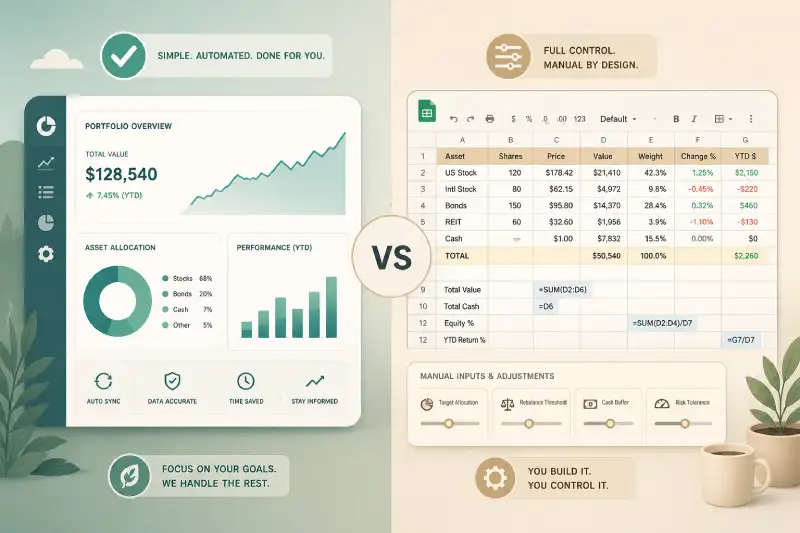
When it comes to tracking your investment portfolio, two options consistently stand out: purpose-built tools like Marketlog and the ever-flexible Google Sheets. Both approaches have passionate supporters. One side argues for simplicity and automation, the other for total control and customization. But which is right for you? Let’s break down the real trade-offs between Marketlog and Google Sheets, and help you decide which approach fits your investing style.
Simplicity vs Control: The Core Trade-Off
The choice between Marketlog and Google Sheets is not just about features—it’s about philosophy. Marketlog is designed to make portfolio tracking effortless and accurate, minimizing manual work and eliminating common errors. Google Sheets, meanwhile, offers a blank slate: you define the structure, formulas, and logic, tailoring everything to your preferences. The question is, do you want a tool that “just works,” or do you want to build your own system from scratch?
Marketlog: Portfolio Tracking Without the Headaches
Marketlog’s core strength is its focus on automation and clarity. You connect your accounts or enter trades, and Marketlog takes care of the rest—fetching prices, calculating returns, and generating performance reports. There’s no need to hunt down formulas or debug broken spreadsheets. For most investors, this means:
- Consistent, accurate performance calculations
- Automatic price updates and corporate action handling
- Clean, intuitive dashboards that surface what matters
- Less time spent on data entry and troubleshooting
It’s especially helpful for investors who want to focus on analysis and decision-making, not spreadsheet maintenance. If you’ve ever wondered why Most Investors Misread Their Own Returns, you’ll appreciate how Marketlog prevents common mistakes like miscalculating IRR or mishandling cash flows.
Google Sheets: Total Flexibility, Complete Responsibility
Google Sheets is beloved by tinkerers and power users for a reason. If you have a unique portfolio structure, want to experiment with custom metrics, or enjoy building your own dashboards, Sheets gives you the freedom to do it all. You’re in charge of:
- Designing your own data model and layout
- Writing and maintaining all formulas
- Updating prices (manually or via scripts/APIs)
- Ensuring accuracy and troubleshooting errors
This flexibility comes at a cost. As your portfolio grows, so does the risk of broken formulas, outdated references, or subtle mistakes that skew your results. Many investors reach a point where maintaining their spreadsheet becomes more work than benefit—a problem discussed in depth in Marketlog vs Excel: When Spreadsheets Stop Working.
Performance Analysis: Where Errors Hide
One of the biggest risks with DIY spreadsheets is performance analysis. Calculating time-weighted or money-weighted returns correctly is notoriously tricky, especially with irregular cash flows. Even experienced investors can overlook edge cases, leading to overestimated or underestimated returns. If you’re serious about understanding your true performance, it’s worth reading Why Investors Overestimate Their Returns and learning How to Read Your Performance Graph Correctly.
Marketlog is built to get these calculations right, every time. Google Sheets can do it—but only if you invest the time to build and validate the logic yourself, and keep it working as your portfolio evolves.
Collaboration, Security, and Data Integrity
Google Sheets makes it easy to share your portfolio with others, but it also makes accidental edits and data loss more likely. Version control and audit trails are limited. Marketlog, on the other hand, keeps a secure, tamper-proof history of your transactions and performance, reducing the risk of accidental mistakes or overwriting critical data.
Who Should Choose Marketlog?
- Investors who want reliable, automated performance tracking
- Those who value clear dashboards over endless customization
- Anyone who’s made costly spreadsheet mistakes in the past
- Investors managing multiple accounts or complex portfolios
Who Should Choose Google Sheets?
- DIY enthusiasts who enjoy building and maintaining their own tools
- Investors with highly specialized needs or unusual asset classes
- Those who want to experiment with custom analytics and reporting
- People comfortable with troubleshooting formulas and scripts
The Bottom Line
Marketlog and Google Sheets both have their place in an investor’s toolkit. If you crave simplicity, reliability, and peace of mind, Marketlog is hard to beat. If you love tinkering and need total control, Google Sheets is unmatched. But remember: the more complex your portfolio, the more likely spreadsheets are to let you down—sometimes in ways you won’t notice until it’s too late.
If you’re interested in how Marketlog compares to other portfolio tools, you might also find value in our deep dives on Marketlog vs Sharesight and Marketlog vs Yahoo Finance Portfolio.